Cloudflare
Cloudflare
A
feature-packed CDN with one of the best free plans around.

Cloudflare is a hugely successful American service which combines a reverse proxy with a content delivery network, and throws a host of bonus security and optimization tools into the technical mix.
The service isn't a conventional CDN. You don't have to choose the specific content you'd like to cache, and there's no need to edit your site code. Instead, you update your DNS nameservers to use Cloudflare, and once the changes have propagated (officially this could take 24 hours, typically it's much less) the service kicks in automatically.
Some of the benefits are similar to other CDNs. Cloudflare detects the location of any visitors and directs them to its nearest data centre. This serves your content from its own cache if possible, improving response times.
The service isn't a conventional CDN. You don't have to choose the specific content you'd like to cache, and there's no need to edit your site code. Instead, you update your DNS nameservers to use Cloudflare, and once the changes have propagated (officially this could take 24 hours, typically it's much less) the service kicks in automatically.
Some of the benefits are similar to other CDNs. Cloudflare detects the location of any visitors and directs them to its nearest data centre. This serves your content from its own cache if possible, improving response times.
Other advantages are more low-level.
Because Cloudflare knows all about your web traffic, it can filter it in
various ways. The program can block threats based on reputation, HTTP headers,
blacklists and more. It can stop or restrict abusive bots, limit comment spam,
protect key ports (SSH, telnet, FTP) from hackers.
Quality extras include some
effective image optimizations.
Cloudflare's ‘Polish’ technology works to reduce
image file sizes by an average of 35%, while ‘Mirage’ uses multiple techniques to optimise how
images are displayed on mobile devices. These features alone could make a huge
speed difference to some sites.
While Cloudflare has a strong focus
on ease-of-use and consumer-friendly features, the service also offers plenty
for the more demanding and technical user. You get support for IPv6, HTTP/2 and
SPDY, WebSockets, page rules to manipulate traffic, a REST API, dedicated SSL
certificates and more.
Pricing
The Cloudflare product range starts
with a basic free plan. This places strict limits on some features (basic DDoS
protection only, just 3 page rules included), and drops others entirely (no
image optimisations), but there are no stupid restrictions to try and force you
to upgrade. You get the same access to some advanced features, like the REST
API, as the commercial accounts. The plan is free forever, too, with no
bandwidth limits.
Cloudflare Pro is a $20 (£16) a
month account aimed at professional users. This extends the free plan with
Cloudflare's Web Application Firewall, throws in the image optimisation tools,
and allows up to 20 page rules. The email support gets a median response time
of two hours, rather than 13 hours with the free plan. Overall, there's
probably enough functionality here to justify the cost, especially for high
traffic sites which would be hit with extra bandwidth charges on other CDNs.
Cloudflare Business ramps up the
high-end features with advanced DDoS protection, custom SSL certificate upload,
optimised delivery of dynamic content, PCI compliance, prioritised support and
up to 50 page rules. All this sounds good to us, although we're less convinced
by the $200 (£160) a month price tag.
You can extend these plans with a
range of add-ons. A dedicated SSL certificate costs only $5 (£4) a month; 5
extra page rules costs $5 (£4); smart routing and load balancing also start at
$5 (£4) a month, and rate limiting protects against denial of service attacks,
brute-force password attempts and more for $0.05 per 10,000 good requests.
Setup
Creating a Cloudflare account works
much like any other web service. Enter your email address, choose a password,
and that's essentially it.
You start the process of
accelerating your first website by entering its domain. Cloudflare grabbed
every DNS record we knew existed and a few we didn't, then it provides an
option to add more, and allows the user to decide which settings it's going to
take over, and which they’ll manage themselves. (If you've no idea, it's
usually safe to accept the default settings – they can be changed later, if
necessary).
After that, the only remaining step
is to set your domain name servers to point at Cloudflare. This requires
visiting your domain registrar, web host or whoever else is managing your
domain, and following the instructions in their control panel. It will probably
take a few hours for the new settings to spread around the web, but there's no
downtime; your website will continue working as normal.
Cloudflare's web console opens with
an Overview page which displays your current site status. This will initially
tell you that you have a "DNS modification pending", but eventually
the site will be marked as "Active".
The console displays small icons for
12 more function areas, including Analytics, DNS, Firewall, Speed, Caching,
Page Rules, Network, Traffic and Customise. Even experts will be left guessing
at what might be in some of these, but clicking each one in turn reveals more.
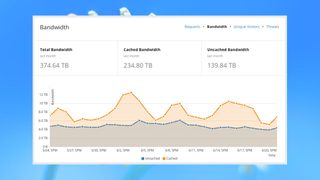
The Analytics area has a stack of
detailed reports covering bandwidth usage, requests, DNS traffic, cache
effectiveness, unique visitors, threats blocked and more. Even the free plan
gets most of these, although there are some significant time-related limits
(the DNS report covers the last 6 hours only; the Pro account maintains up to a
day).
The Crypto area enables managing
your website cryptography, creating and installing SSL certificates and
configuring related options. Some of its settings are extremely obvious (you
can turn on ‘Always use HTTPS’ with a click). Others require more experience
and thought, including options to turn on HSTS or set TLS 1.3 support. But
every setting comes with detailed help embedded in the page, and although it
won't turn you into a security expert, even novice users will find it handy.
The Speed button gives you access to
some interesting website optimizations. Every plan includes an Auto Minify
option to reduce the size of JavaScript, CSS and HTML files, and a Rocket
Loader function to improve load time for JavaScript-heavy pages. The Pro and
higher plans also get tools to reduce image sizes and load them more
efficiently. Not every option is enabled by default, so it definitely pays to
explore.

The Caching area has a similar mix
of straightforward and more unusual features. There's a button to instantly
clear your cache, for instance, just as you'd expect. But there's also an
interesting Always Online feature which steps in if your web server goes down,
serving pages from the cache where appropriate, and using a custom ‘error’ page
for everything else. And a Development Mode switch temporarily bypasses the
Cloudflare cache, enabling you to see any updates to your site in real-time.
The Scrape Shield panel has a couple
of useful options. In a click or two Cloudflare can obfuscate any displayed
email addresses to prevent them being harvested by spammers, and protect your
images from being hot-linked by other sites.
There are plenty more settings
available, covering DNS, page rules, low-level network configuration, and a
host of ‘apps’ to enhance your website: Google Analytics, PayPal buttons,
embedded YouTube videos, live chat, NoAdBlock ad-blocking detection, social
media buttons and more.
Cloudflare has an impressive feature
set, and even the free version contains plenty of power. If we have one
concern, it's the way that mission-critical options often sit alongside more
standard settings, rather than being hidden away in an ‘Experts Only’ panel.
One click in the wrong place could easily break your site, so it's wise to
think very carefully before you change anything.
Performance
Working out which is the fastest CDN
for you is a complicated business. Every service has its own network which
might excel in one country, but disappoint in another. A CDN has to match up
with your website visitors, too. Top performance in Europe is no use at all if
your visitors are mostly from North America.
Cloudflare's July 2017 response
times rated an average 9th place (out of 24) in North America, which might seem
disappointing – until you notice the service achieved second place in Europe
and Africa, sixth in Asia, fourth in Oceania and third in South America. That's
far more consistent than almost anyone else, and lifted the company to third
place worldwid.
This isn't the whole story.
Cloudflare scores highly in the overall figures because it has a very large
network with servers across the globe, delivering at least some benefit to a
large number of people. But if your website audience comes mainly from one or
two countries, the results may be very different. Cloudflare rates a mid-range
12th in the UK, for instance, and 13th in the US.
However Cloudflare performs in your
target areas, keep in mind that you may see other speed benefits from its
website optimisations. Put it all together and there's a lot of performance
boosting potential here, more than enough to justify signing up for the free
plan and trying it for yourself.
Finally
Cloudflare is easy-to-use and
provides loads of features, great security, and effective website optimizations, not to mention a speedy global network which reaches areas other
CDNs often miss. That makes it a must for your performance boosting shortlist.

Comments
Post a Comment